Overview#
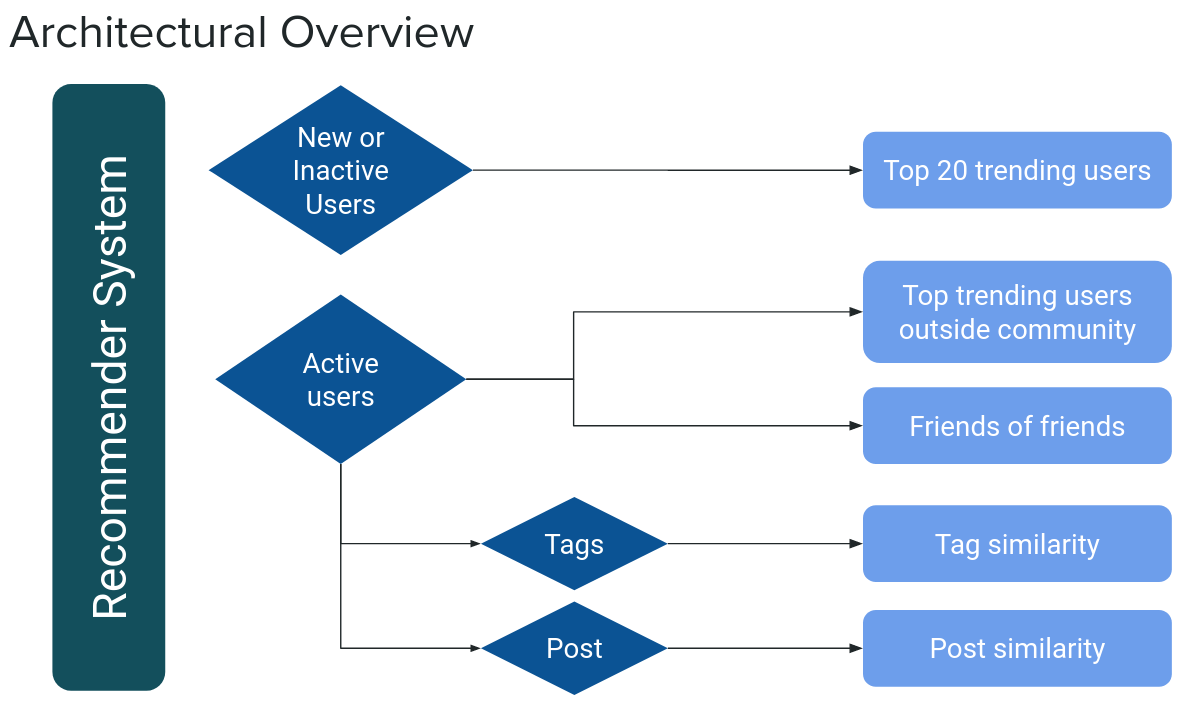
Our objective was to develop a user recommendation system that fosters network growth by connecting users with similar interests. To achieve this, we designed a system that utilizes on-chain data for each user. We employed four distinct recommendation algorithms, as illustrated in the architectural overview below:
Top trending users
Friends of friends
Tag similarity
Post similarity
System#
This section describes the overall architecture of the recommender system, including the flow of data and the different recommendation algorithms utilized.
- Recommendation system logic:
If the user is new (< 1 week, < 3 days): appends trending users
If the user is not active: appends trending users
If the user is active: appends friends-of-friends
If the user has a tag: appends tag similarity
If the user has posted: appends post similarity
If the user was inactive for some period: appends trending users
Commands#
This section provides details about the functions the models use for their recommendations.
Along with the main recommender functions, we expose commands that can be scheduled for repeating updates.
get_recommendations_per_user()
See near_recommender/src/process_recommendations.py for reference on how to use the main logic, pushing updated JSON objects for each user to an S3 bucket.
update_corpus()
The update_corpus command is responsible for updating the locally stored Large Language Model, which is defined in the path variable within the similar_posts module.
Each update in the pooled word embeddings model triggers an increment in its version number.
The function load_pretrained_model, which is used in similar_posts, handles loading the latest version.
Machine Learning Model Management
Feel free to optimize this with your own version management for machine learning models.
Models#
This section provides details about the machine learning models and algorithms used in the recommender system.
Trending Users#
The trending users algorithm appends the top trending users to the recommendation list. This method is applied in the following cases:
If the user is new (< 1 week, < 3 days)
If the user is not active
If the user was inactive for some period
- near_recommender.src.models.trending_users.get_trending_users()#
Retrieves trending users based on specified metrics and community detection algorithms.
- Returns:
A JSON object containing the usernames and community IDs of the top 20 trending users.
- Return type:
Dict
Friends-of-Friends#
The friends-of-friends algorithm appends users who are friends-of-friends to the recommendation list. This model is applied when the user is active.
- near_recommender.src.models.friends_friends.get_friends_of_friends(spark_df_path)#
Reads a CSV file as a Spark DataFrame and trains an XGBoost model to predict user connections.
- Parameters:
spark_df_path (str) – The path to the CSV file containing the input data for the Spark DataFrame.
- Returns:
A dictionary containing the predicted users as a NumPy array.
- Return type:
Dict
Similar Posts#
The similar posts model appends users who have made similar posts to the recommendation list. This model is applied when the user has posted.
- near_recommender.src.models.similar_posts.get_similar_post_users(query, top_k=5)#
Returns the top k most similar sentences in a corpus to a given query sentence.
- Parameters:
query (str) – The query sentence to find similar sentences for.
top_k (int, optional) – The number of top similar sentences to return. Defaults to 5.
- Returns:
A dictionary containing the top-k most similar sentences to the query.
- Return type:
dict
- near_recommender.src.models.similar_posts.load_corpus_embeddings(filename)#
Loads the corpus embeddings from a given filename using a SentenceTransformer model.
- Parameters:
filename (str) – The filename of the pretrained model to load the corpus embeddings from.
- Returns:
A tuple containing the loaded corpus embeddings, the list of sentences, the DataFrame, and the SentenceTransformer model.
- Return type:
Tuple[object, list[str], object, SentenceTransformer]
- near_recommender.src.models.similar_posts.update_corpus()#
Updates a large language NLP sentence transformer model with new data. The model is saved to the location specified in the path variable.
- Returns:
None
- Return type:
None
SQL queries#
This query is used to remove duplicates from hive_metastore.mainnet.silver_near_social_txs_parsed table.
The query utilizes two Common Table Expressions (CTEs) to handle transactions. All transactions are aggregated, with a new column tx_count counting the number of times each transaction appears. Then, using this column, transactions are filtered:
duplicatesThis CTE captures all transactions that are duplicated (tx_count > 1).unique_txsThis CTE contains only the unique transactions (tx_count = 1).
By merging these two CTEs, we create a new table without any duplicates. The resulting table is saved as hive_metastore.sit.near_social_txs_clean.
This query is used to create an edge table that represents the social network in a graph format.
Each row of this table represents a follow transaction with:
signer_id
user followed
type (FOLLOW or UNFOLLOW)
date
First step is to parse the graph:follow argument from the hive_metastore.mainnet.silver_near_social_txs_parsed table and filter non-null, non-empty and non-failed transactions as represented by the WHERE clause on the first CTE.
Then, two different CTEs extract the followed user name on two different scenarios:
single_user_followsextracts the substring that contains the user name. In this case, each transaction represents following one single userbatch_user_followsuses the same logic to extract the user name but uses first an explode to deal with multiple follows in a single transaction. This was enabled by a batch following widget.
By merging the two CTEs above, we obtain a table with the edges of the graph representing the following connections in the social network. This table is saved as hive_metastore.sit.graph_follows.
Query to create a table with different user metrics and calculate trending metric from them.
Metrics can be divided into 3 categories:
Metrics directly aggregated from the
hive_metastore.sit.near_social_txs_cleantable. These include 10 all-time metrics and 4 metrics for the past 30 days. All of them are calculated in the CTEsmetrics_rawandlast_month_activity.Metrics that need additional CTES for their calculation:
Likes are calculated parsing the
index:likeargument from thehive_metastore.mainnet.silver_near_social_txs_parsedtable and agreggating for the signer:id and the likee separately. Additionally, both metrics are calculated for the past 30 days.Follows are calculated following the same structure as for the graph table query (see section above). When calculating the total followers and following for each user, separate methods have been used, empirically testing them with data from the social network. There is some slight mismatch which is thought to be caused by some missing transactions, but the final result is accurate enough (Max. 3% error on one user from the top 10 most followed accounts).
Comments for the past 30 days are calculated parsing the
post:comment:itemargument from thehive_metastore.mainnet.silver_near_social_txs_parsedtable.
Engagement, activity and trending metrics. These are calculated based on the previous categories, with the following definitions:
Engagement is calculated as the sum of comments, likers and followers in the past 30 days. There is a weighted variant using 1, 0.5 and 0.1 weights respectively.
Activity is calculated as the sum of posts, likes and followings in the past 30 days. There is a weighted variant using 1, 0.5 and 0.1 weights respectively.
The trending metric is defined as the ratio between weighted engagement and weighted activity with the intention of selecting the users which create the most appealing content for the network.